VOFM is the transaction where you can maintain Requirement routines, which are assigned through cusomization.
To create a routine you need access key & routine no. starts with "9".for ex. 901,902 etc.
one important thing to note that even if you have some syntax errors inside your routine, it will get activated without errors. So, you need to do Main Program check before activation
How to add a routine number in transaction VOFM
To Create a routine in Transaction VOFM, follow these steps to create routine: You must need the Access Key to create a routines in this transaction because this will have a overall effect on the standard transaction related to deliveries.
1. VOFM->Data Transfer->Deliveries
2. in Routine Number enter number say 802 (For example)
3. Enter Description
4. Double click on routine number, it will ask for access key, provide access key, then it will create include for the routines specified (for 802)
5. Copy and paste your code in the form created automatically in the include program and activate
6. go back -> then select the routines number say 802, go to Edit tab-> Activate, this will activate the routine number created
7. Now your routines will be created, tell the functional owner to assign this routines with the requirement
---------------------------------------
Creating Routine Using VOFM in SAP
2. In the menu bar, choose between Table > Display or Table > Maintain
3. The screenshot shows an example when modifying subroutine in VOFM responsible for the Data Transfer > Billing Documents.

4. Below is a list of all the sub routines in this specific VOFM (Data Transfer > Billing Documents)
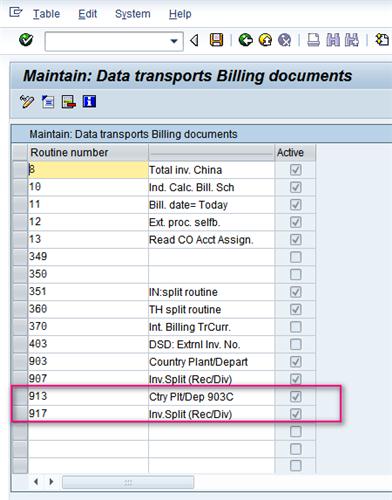
5. Here, I will modify the sub routine 913 or 917.
6. To modify a specified sub routine, double click on the sub routine to modify.
Please Note: That you will required an ACCESS KEY in order to be able to make any modifications to the routine. ACCESS KEY is independent for each sub routine.
Important: After transporting modify VOFM subroutines to other environments, please execute the program ”RV80HGEN’ in SE38 to activate all subroutines. If this action is not carried out, the following exception (VOFM Error) will be raised:
To create a routine you need access key & routine no. starts with "9".for ex. 901,902 etc.
one important thing to note that even if you have some syntax errors inside your routine, it will get activated without errors. So, you need to do Main Program check before activation
How to add a routine number in transaction VOFM
To Create a routine in Transaction VOFM, follow these steps to create routine: You must need the Access Key to create a routines in this transaction because this will have a overall effect on the standard transaction related to deliveries.
1. VOFM->Data Transfer->Deliveries
2. in Routine Number enter number say 802 (For example)
3. Enter Description
4. Double click on routine number, it will ask for access key, provide access key, then it will create include for the routines specified (for 802)
5. Copy and paste your code in the form created automatically in the include program and activate
6. go back -> then select the routines number say 802, go to Edit tab-> Activate, this will activate the routine number created
7. Now your routines will be created, tell the functional owner to assign this routines with the requirement
---------------------------------------
Creating Routine Using VOFM in SAP
1. Go to the transaction code VOFM.
2. In the menu bar, choose between Table > Display or Table > Maintain
3. The screenshot shows an example when modifying subroutine in VOFM responsible for the Data Transfer > Billing Documents.
4. Below is a list of all the sub routines in this specific VOFM (Data Transfer > Billing Documents)
5. Here, I will modify the sub routine 913 or 917.
6. To modify a specified sub routine, double click on the sub routine to modify.
Please Note: That you will required an ACCESS KEY in order to be able to make any modifications to the routine. ACCESS KEY is independent for each sub routine.
Important: After transporting modify VOFM subroutines to other environments, please execute the program ”RV80HGEN’ in SE38 to activate all subroutines. If this action is not carried out, the following exception (VOFM Error) will be raised:
1
2
3
4
5
6
7
8
9
10
|
The exception, which is assigned to class 'CX_SY_DYN_CALL_ILLEGAL_FORM', was
|

No comments:
Post a Comment